Sign in
Use Google to create your free founder account. Submissions are tied to the signed-in owner.
For founders
A complete submission gives reviewers—and future visitors—the context they need to evaluate your product quickly.
Start your submission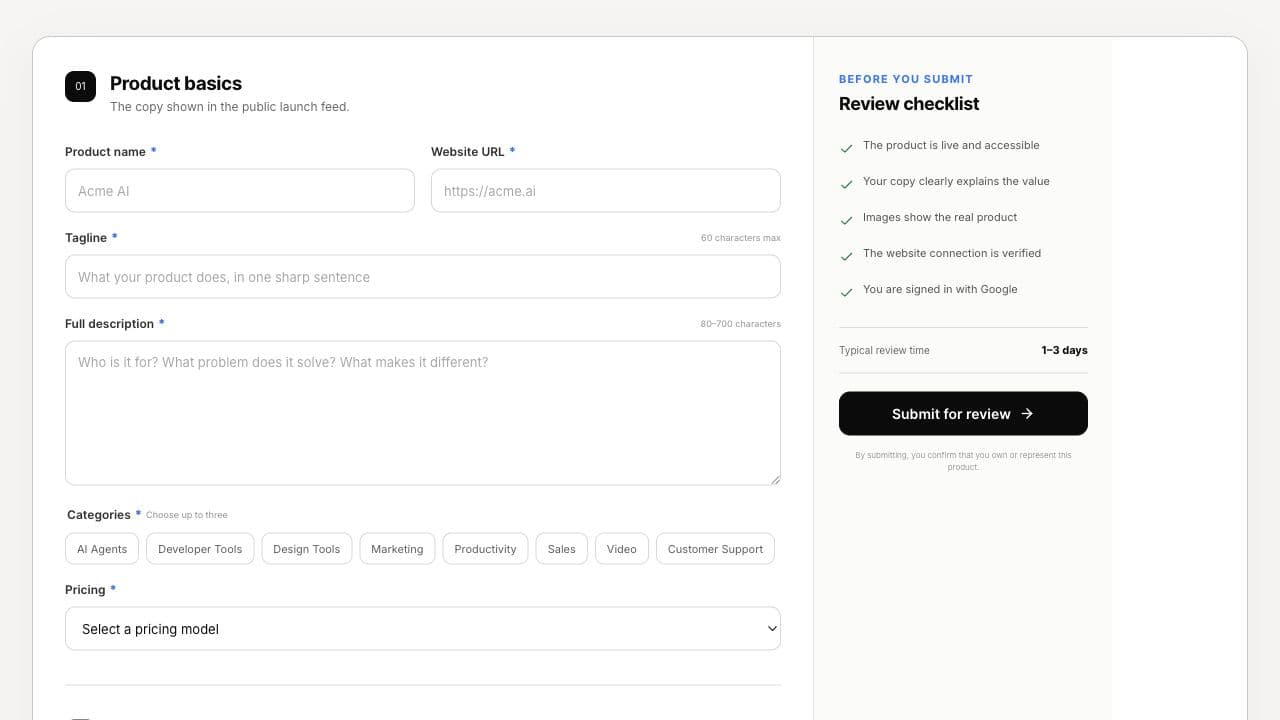
Actual LaunchAgora submission form
The form
You can prepare everything before signing in. The form accepts the product basics, media, founder links, and website connection in one place.
Use Google to create your free founder account. Submissions are tied to the signed-in owner.
Add a concise title, website, tagline, full description, up to three categories, and the product pricing model.
Provide one square logo and one to four landscape screenshots showing the product itself.
A demo, founder note, LinkedIn profile, and X profile are optional but help visitors understand who built the product.
Before submitting
Website connection
Copy the snippet from the last section of the form, publish it on your homepage, footer, about page, or launch page, then enter that page URL and press Check for badge. The submission button remains locked until the connection succeeds.